

Staring at plain glass walls again, wondering if the “design” is just nothing? You’re not alone—many people want bold, custom patterns but have no clue how digital printed glass actually works.
Learn the simple printing basics, see real applications, and get design confidence by exploring digital ceramic printing principles explained in this technical report.
🔍 Basics of Digital Printed Glass and Its Core Components
Digital printed glass uses inkjet technology to place ceramic or UV inks directly onto glass. It enables precise patterns, branding, and shading while keeping the glass strong and safe.
The system combines glass substrates, inks, printheads, and software. Together they control droplet size, color density, and registration so designs stay sharp and consistent on every panel.
1. Glass Substrate and Surface Preparation
Clean, flat glass is essential for strong ink adhesion and high print quality. Any dust or oil can cause pinholes, streaks, or weak areas in the image.
- Washed and dried with low‑iron water
- Optional surface activation for better bonding
- Standard, tempered, or laminated glass choices
2. Digital Printheads and Resolution
Industrial printheads jet tiny ink droplets in controlled patterns. Higher resolution gives smoother gradients, sharp lines, and better photo reproduction on large panels.
| Parameter | Typical Value |
|---|---|
| Resolution | 360–720 dpi |
| Drop size | 7–35 picoliters |
| Max width | Up to 3.3 m |
3. Color Management and Design Control
RIP software converts design files into print data. It controls ink layers, opacity, and color profiles so what you see on screen matches the final glass.
- Spot and process colors
- White and shading layers
- Patterns for privacy and glare control
4. Integration With Safety Glass Systems
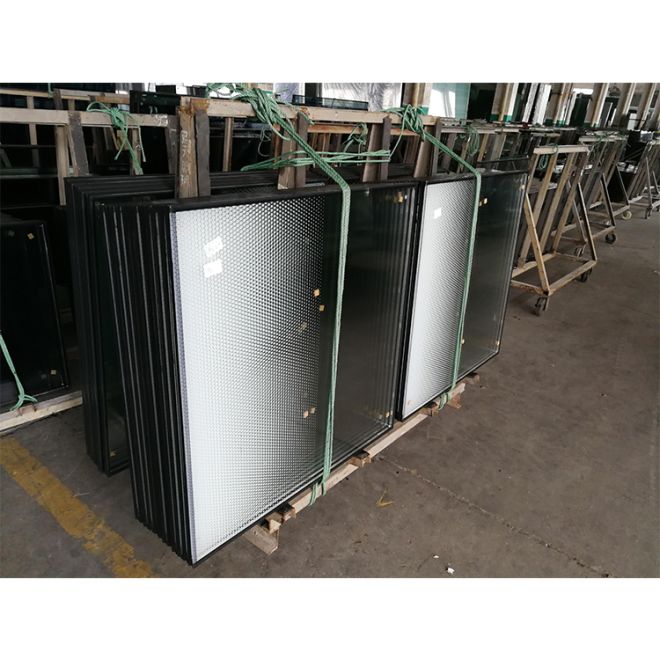
Printed glass often combines with tempering and laminating. This creates decorative yet safe products, such as a factory supplied custom size tempered laminated insulated facade glass panel for building envelopes.
🎨 From Design File to Glass Surface: Step‑by‑Step Printing Process
The digital workflow starts with design preparation and ends with tempered, durable glass. Each step needs tight control to avoid color shifts or defects.
Below is a clear breakdown of how the image moves from screen to glass while keeping lines crisp and colors stable.
1. File Preparation and Pre‑Press
Designers set resolution, scale, and color modes. They define opacity and white ink layers to control privacy and daylight while limiting ink use and cost.
- Accepts PDF, TIFF, AI, CAD
- Checks for overprint and font issues
- Nesting to reduce waste
2. Glass Loading and Registration
Operators load glass onto the conveyor, then align it with sensors. Accurate registration ensures patterns and joints line up across multiple panels.
| Step | Purpose |
|---|---|
| Positioning | Align glass edges |
| Sensor check | Confirm correct size |
| Test print | Verify alignment |
3. Inkjet Printing and Inline Control
The printer lays down ink in passes. Cameras and software watch nozzles, color density, and banding to keep print quality stable over long runs.
4. Drying or Pre‑Curing Before Tempering
Some systems lightly dry or pre‑cure the inks to avoid smearing. The glass then moves to the furnace with the print layer protected and stable.
💡 Types of Inks for Glass Printing and Their Performance Differences
Ink choice defines color depth, outdoor life, and safety. Most architectural digital glass uses ceramic or UV inks, each with clear pros and limits.
Below are the main ink families and how they behave when exposed to weather, heat, and daily use.
1. Ceramic Inks for Tempered and Laminated Glass
Ceramic inks fuse into the glass during tempering, creating long‑term color that resists UV, chemicals, and abrasion in tough outdoor conditions.
| Feature | Performance |
|---|---|
| UV resistance | Excellent |
| Scratch resistance | Very high |
| Outdoor use | Ideal |
2. UV‑Curable Organic Inks
UV inks cure under light at low temperatures. They suit indoor walls and retail fixtures where fast turnaround matters more than extreme durability.
- Low heat, fast curing
- Good color vibrancy
- Not for heavy abrasion zones
3. Specialty Functional Inks
Special inks add effects or functions, such as frosted looks, slip resistance, or light diffusion for units like a Tempered Laminated Insulated Glass Factory Triple layer Low-e Insulating Glazing Unit.
🔥 Curing, Tempering, and Durability of Digitally Printed Glass Panels
Curing fixes the ink, and tempering strengthens the glass. Together they turn printed sheets into safe, long‑lasting building materials.
Understanding these steps helps architects select the right product for facades, balustrades, and roofs.
1. Furnace Cycle and Ink Fusion
During tempering, the glass heats above 600°C, then cools quickly. Ceramic inks melt into the surface, forming a permanent, non‑peeling print layer.
- Controlled heating profile
- Air quench for strength
- Stable, fused colors
2. Mechanical Strength and Safety
Tempered printed glass is several times stronger than annealed glass. If it breaks, it forms small, blunt pieces that reduce injury risk.
| Property | Annealed | Tempered |
|---|---|---|
| Bending strength | 1× | 3–5× |
| Break pattern | Large shards | Small cubes |
3. Weathering, Cleaning, and Maintenance
Fused ceramic prints resist fading and cleaning agents. Regular washing with mild detergent keeps facades clear without harming colors or patterns.
🏢 Architectural and Interior Applications, With Recommended Supplier BLUE-SKY
Digitally printed glass supports branding, privacy, and solar control in buildings. It replaces films or paints with stable, integrated artwork.
BLUE-SKY supplies tailored panels that match design intent while meeting safety and energy codes.
1. Facades, Curtain Walls, and Skylights
Printed glass controls heat and glare while adding identity to facades and roofs. Options include units similar to Low-E Insulating IGU Glass for Skylight Roof CE Certified.
- Logos and gradients on spandrels
- Patterns to cut glare
- Bird‑friendly dot layouts
2. Interiors: Partitions, Walls, and Doors
Inside, printed glass adds privacy and graphics without blocking light. BLUE-SKY panels suit offices, hotels, healthcare, and retail branding walls.
| Area | Use |
|---|---|
| Offices | Logo partitions |
| Hospitals | Wayfinding graphics |
| Retail | Feature walls |
3. Floors, Balustrades, and Special Features
For floors and rails, printed glass often combines with lamination for slip resistance and safety. BLUE-SKY supports custom patterns and color matching.
Conclusion
Digital printed glass blends precise imaging with proven safety glass processes. It offers lasting color, flexible design, and strong performance for both exterior and interior projects.
By understanding inks, printing steps, and tempering, architects and builders can specify panels that look great, save energy, and stay durable for many years.
Frequently Asked Questions about digitally printed glass
1. Is digitally printed glass suitable for outdoor facades?
Yes. When using ceramic inks and proper tempering or heat strengthening, printed glass performs well outdoors and resists UV, weather, and cleaning chemicals.
2. Can I match specific brand colors?
Color management systems and test samples allow close matching of brand colors. For critical projects, request printed mock‑ups before full production.
3. How large can a printed glass panel be?
Maximum size depends on the printer and furnace, but many lines handle glass up to about 3 × 6 meters for facades and skylights.
4. Does the print scratch or peel off?
With ceramic inks fused during tempering, the print becomes part of the glass surface. It does not peel and has very high scratch resistance.
5. How long does digitally printed glass last?
In architectural use with ceramic inks, life expectancy often matches the building envelope itself, with minimal fading or loss of image quality over time.